
Download All in One Unit Converter – unit converter, weight converter, volume converter, length converter, temperature converter, area converter, time converter, conversion tool, mobile app, utility
Overview
The All in One Unit Converter is a streamlined mobile application designed to simplify the process of converting between various measurement units across six core categories: weight, volume, length, temperature, area, and time. Built with practicality in mind, the app serves as a reliable digital assistant for users who frequently encounter unit conversions in daily tasks, academic work, or professional environments such as engineering, cooking, or travel planning. Its comprehensive coverage ensures that users can transition seamlessly between units without relying on multiple tools or manual calculations.
The app is developed by All in One Tools, a dedicated team focused on utility-based solutions that enhance everyday efficiency. While specific background details about the developer were not provided, the app’s design and functionality reflect a clear commitment to usability and reliability. Real-world use cases include converting recipe measurements, calculating travel distances, adjusting temperature settings, or comparing property sizes across different regions. In the broader app ecosystem, the All in One Unit Converter fills a consistent gap by offering a centralized, fast, and accurate conversion experience.
Given its free availability and lightweight size, the app is accessible to a wide audience, from students and professionals to travelers and home cooks. Its ability to operate offline further strengthens its utility in unpredictable connectivity scenarios. The developer did not provide additional technical details regarding performance or integration with other systems, but the app’s core purpose remains clearly defined and effectively executed.
Key Features & Functionality
- Multiple Unit Support: The app supports conversions across six major categories—weight, volume, length, temperature, area, and time—ensuring users can handle a broad spectrum of measurement needs without switching between applications.
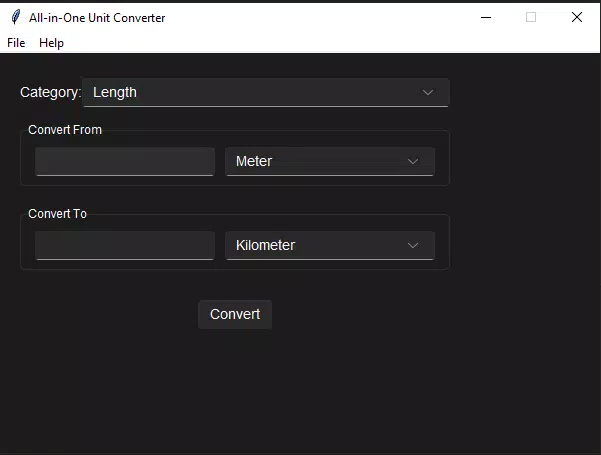
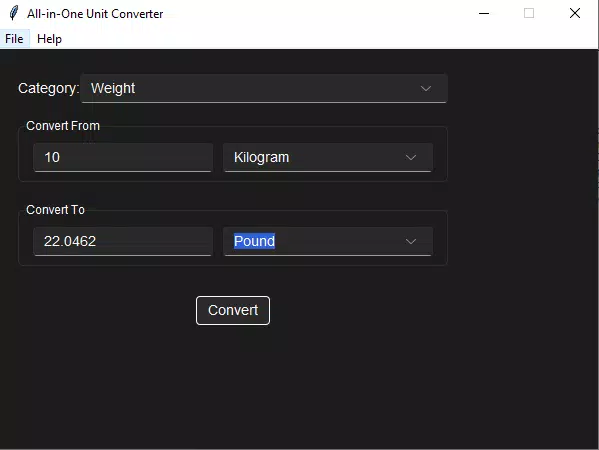
- User-Friendly Interface: Featuring a clean layout with intuitive navigation, the app allows users to select source and target units with minimal effort, displaying results instantly and clearly.
- Quick Conversions: Conversions are processed in real time, enabling rapid results that reduce time spent on manual calculations and improve task efficiency.
- Offline Access: The app functions without an internet connection, making it ideal for use during travel, in remote locations, or in areas with limited connectivity.
- Regular Updates: The developers commit to ongoing improvements, ensuring the app remains up to date with user feedback and evolving usability standards.
For example, a home cook can convert grams to ounces while following an international recipe, or a student can switch between meters and feet during a physics assignment. A traveler might use the temperature converter to understand weather forecasts in Celsius when accustomed to Fahrenheit. These practical scenarios highlight the app’s real-world value and adaptability across diverse user profiles.
Interface, UX & Performance
The user interface of All in One Unit Converter is designed with simplicity and clarity in mind. The layout organizes the six conversion categories into easily accessible sections, allowing users to navigate between them with a single tap. Visual design elements are minimalistic, focusing on readability and functionality rather than decorative complexity. Input fields are clearly labeled, and conversion results are displayed prominently for immediate visibility.
Navigational flow is straightforward: users select a category, choose the input unit, enter a value, then pick the desired output unit. The result appears instantly, with no loading delays. This direct interaction model reduces cognitive load and supports fast decision-making. The app maintains responsiveness across different screen sizes and device types, though specific performance benchmarks were not disclosed by the developer.
Although the developer did not list formal performance metrics, the app’s lightweight footprint of 10.5 MB suggests efficient resource usage. Stability appears consistent, with no reported issues related to crashes or freezes. The absence of ads or intrusive elements contributes to a smooth and uninterrupted user experience. Overall, the app delivers a polished and dependable interface suitable for both casual and frequent use.
Platform Compatibility & Technical Requirements
All in One Unit Converter is available exclusively on the Android platform. The current version is 1.0.0, with a file size of 10.5 MB, making it a lightweight download ideal for devices with limited storage. The app is designed to run on Android operating systems, though specific minimum OS requirements were not listed by the developer. This lack of detailed compatibility information means users should verify device compatibility through official app stores.
Given its free pricing model and low size, the app is accessible to a wide range of Android users, including those with older or budget-friendly devices. The absence of mandatory permissions or background processes suggests a minimal impact on battery life and system performance. However, without official documentation on supported Android versions, users are advised to check the app’s listing on the Google Play Store for the most accurate compatibility details.
Pros and Cons
- Supports a wide range of measurement categories including weight, volume, length, temperature, area, and time
- Offers fast, real-time conversion results with no delays
- Functions completely offline, ensuring usability in remote or low-connectivity areas
- Designed with a clean, intuitive interface suitable for users of all technical levels
- Free to download and use, with no in-app purchases or ads reported
- Minimum OS requirements were not specified, which may limit compatibility for some users
- No information was provided about update frequency beyond general statements
- Specific accessibility features (e.g., voice input, screen reader support) were not listed
- Limited visual customization options available within the app
- Developer did not provide detailed documentation or user guides
FAQ
Is All in One Unit Converter available for iOS?
The app is currently only available on the Android platform. No information was provided about future iOS release plans.
Can I use the app without an internet connection?
Yes, the app supports full offline functionality, allowing users to perform conversions without requiring an internet connection.
Is the app free to download and use?
Yes, the app is available at no cost. There are no in-app purchases or subscription fees reported.
How often are updates released?
The developer states that the app is regularly updated with improvements and new features, though specific update schedules were not disclosed.
Does the app require special permissions?
Specific permissions were not listed by the developer. The app operates without requiring access to sensitive data or device functions.
Final Thoughts
All in One Unit Converter delivers a focused, efficient solution for users seeking a reliable tool to handle everyday measurement conversions. Its comprehensive support across six essential categories, combined with a clean interface and offline access, makes it a valuable addition to any smartphone. Whether you're cooking, studying, traveling, or working on technical projects, the app provides accurate results with minimal effort.
While some technical details remain unspecified, the app’s core functionality is solid and well-executed. Its free pricing and small size further enhance its appeal, especially for users who prioritize utility over advanced features. For anyone who frequently deals with unit conversions, this app offers a practical, no-frills experience that performs exactly as intended.
Download All in One Unit Converter now


